Developer’s Guide
This guide provides an overview of the DataIO architecture and codebase structure for new contributors. It will help you understand how the different components work together and how to set up your development environment.
Architecture Overview
DataIO follows a layered architecture pattern with clear separation of concerns. The diagram below shows the high-level architecture:
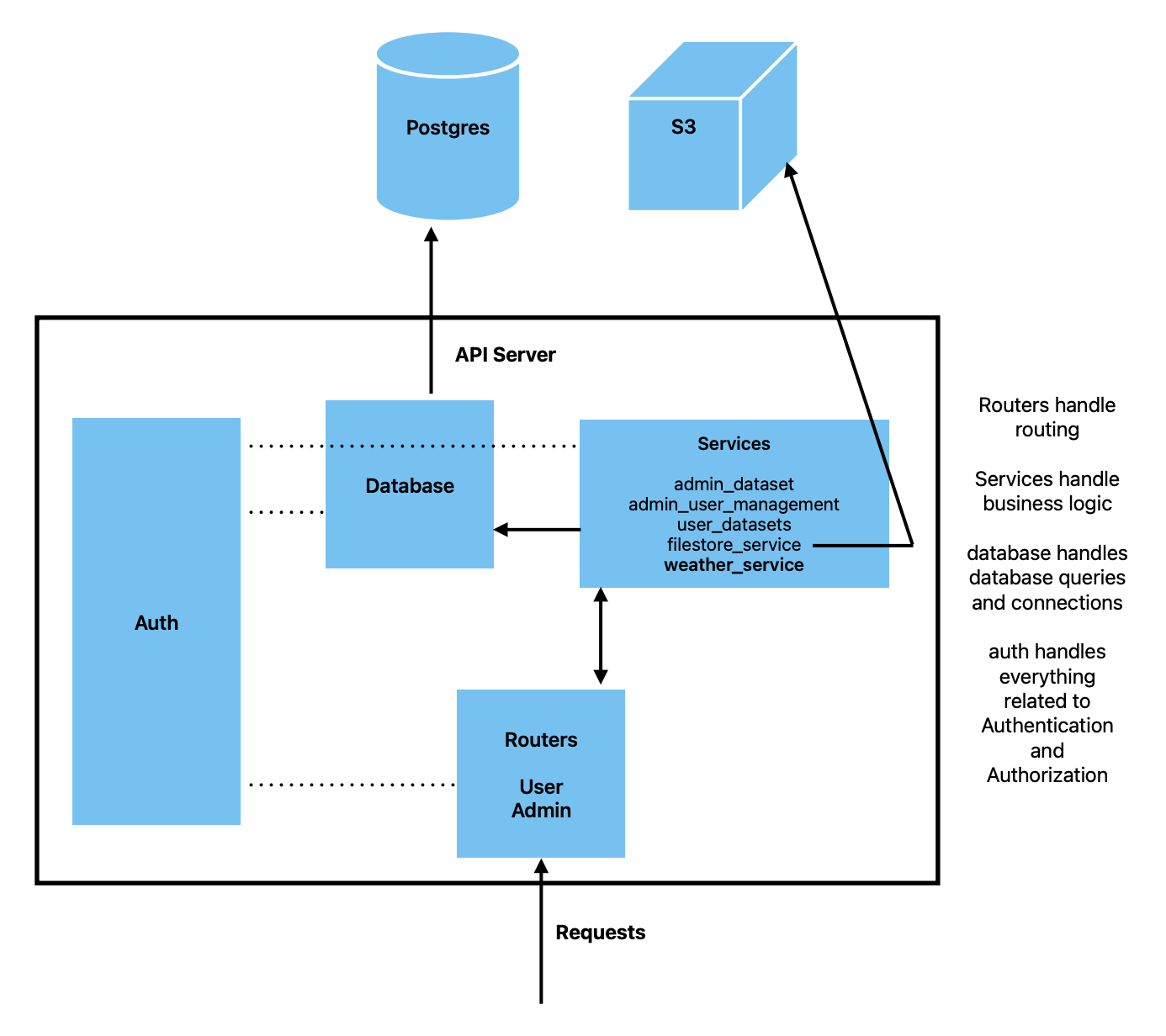
Request Flow
When a client makes a request to the API:
Request Entry - HTTP requests arrive at the API server
Router Layer - Routes the request to the appropriate endpoint handler
Authentication - Validates API keys and determines user permissions
Service Layer - Executes business logic for the requested operation
Database Layer - Handles database queries and connections
External Systems - Interacts with PostgreSQL database and S3 storage
Response - Returns data back through the layers to the client
Core Components
1. Routers
Location: src/dataio/api/routers/
Routers handle HTTP request routing and endpoint definitions. They are responsible for:
Defining API endpoints and HTTP methods
Request/response validation using Pydantic models
Delegating business logic to service layer
Handling HTTP-specific concerns (status codes, headers, etc.)
User Router (user.py)
Handles user-facing endpoints for accessing and downloading datasets:
GET /api/v1/datasets- List available datasetsGET /api/v1/datasets/{dataset_id}/{bucket_type}/tables- List tables in a datasetGET /api/v1/datasets/{dataset_id}/{bucket_type}/{table_id}- Download a specific tableGET /api/v1/weather/*- Weather data endpoints
Example:
@user_router.get("/datasets")
async def get_datasets(
    limit: int = Query(100, ge=1, le=100),
    user: User = Depends(get_user),
    user_service: UserService = Depends(UserService),
):
    logger.info(f"CATALOGUE_VIEW_REQUEST: {user.email}")
    return user_service.get_user_datasets(user, limit)
Admin Router (admin.py)
Handles administrative endpoints for managing datasets, users, and permissions:
Dataset creation, updates, and deletion
User management and permission assignment
Bulk operations and administrative tasks
2. Services
Location: src/dataio/api/services/
Services contain the business logic of the application. They:
Process data and implement business rules
Coordinate between multiple data sources
Handle complex operations that span multiple database queries
Manage external service interactions (S3, etc.)
All services inherit from BaseService which provides common functionality like logging.
User Service (user_service.py)
Handles user-facing operations:
Retrieving datasets with permission filtering
Generating presigned S3 URLs for downloads
Managing user access to preprocessed data
Admin Dataset Service (admin_dataset_service.py)
Manages dataset lifecycle:
Creating and updating datasets
Managing dataset metadata
Handling dataset relationships (collections, tags, etc.)
Admin User Management Service (admin_user_management_service.py)
Handles user administration:
Creating and managing user accounts
Assigning and revoking permissions
Managing API keys
Filestore Service (filestore_service.py)
Manages file storage operations:
Generating presigned S3 URLs for secure downloads
Handling file uploads and retrievals
Managing bucket access
Weather Service (weather_service.py)
Specialized service for weather data:
Retrieving weather datasets and metadata
Managing weather-specific data access patterns
Handling weather data downloads
3. Database Layer
Location: src/dataio/api/database/
The database layer provides abstraction for all database operations.
Database Configuration (config.py)
Manages database connections using SQLAlchemy:
Reads credentials from environment variables
Creates database engine and session factory
Connection pooling and management
Example:
DATABASE_URL = f"postgresql://{DB_USER}:{DB_PASSWORD}@{DB_HOST}:{DB_PORT}/{DB_NAME}"
engine = create_engine(DATABASE_URL)
Session = sessionmaker(bind=engine)
Database Models (models.py)
SQLAlchemy ORM models representing database tables:
User- User accounts and API keysDataset- Dataset metadata and configurationCollection- Groupings of related datasetsRawDataset- Source data referencesDataOwner- Ownership and contact informationUserPermission- Fine-grained access control
Database Functions (functions.py)
Utility functions for common database operations:
Query builders for complex operations
Transaction management helpers
Data retrieval and manipulation functions
Enumerations (enums.py)
Database enum types:
AccessLevel- NONE, VIEW, DOWNLOADSpatialResolution- Geographic resolution levelsBucketType- STANDARDISED, PREPROCESSEDOther domain-specific enumerations
5. API Models
Location: src/dataio/api/models.py
Pydantic models for request/response validation:
Request body schemas
Response schemas
Data transfer objects (DTOs)
Input validation and serialization
These models ensure type safety and automatic API documentation.
6. External Systems
PostgreSQL Database
Primary data store containing:
User accounts and credentials
Dataset metadata and relationships
Permission mappings
Configuration data
S3 Storage
Object storage for actual dataset files:
CSV/Parquet data files
Shapefiles and geospatial data
Generated reports and exports
Access is managed through presigned URLs generated by the Filestore Service.
Database Setup
DataIO includes scripts to set up your PostgreSQL database for local development.
Prerequisites
Install PostgreSQL (version 12 or higher)
Create a
.envfile with database credentials:
DB_USER=your_username
DB_PASSWORD=your_password
DB_HOST=localhost
DB_PORT=5432
DB_NAME=dataio
MIGRATIONS_DIR=src/dataio/db/migrations
Option 1: Full Setup (Recommended for Development)
Use this script to create the database with sample data and test users:
bash ./src/dataio/db/init/recreate_full.sh
This script will:
Drop the existing database if it exists
Create a new database from scratch
Apply all migrations from
src/dataio/db/migrations/in orderInsert sample datasets using
src/dataio/db/init/insert_datasets.pyCreate test users with API keys using
src/dataio/db/init/users.py
Test API keys will be generated in src/dataio/db/init/data_inserts/ folder. You can use these for testing the API.
Option 2: Schema Only
Use this script if you want just the database schema without sample data:
bash ./src/dataio/db/init/recreate.sh
This script will:
Drop the existing database if it exists
Create a new database from scratch
Apply all migrations from
src/dataio/db/migrations/in order
Use this option when you want to:
Manually insert your own data
Test migrations without sample data
Set up a clean production-like environment
Database Migrations
All database schema changes must be versioned as migration scripts in src/dataio/db/migrations/. Migrations are applied in lexicographic order, so name them appropriately (e.g., 001_initial_schema.sql, 002_add_weather_tables.sql).
Migration best practices:
Use transaction blocks (
BEGIN; ... COMMIT;)Include rollback instructions as comments
Test migrations on a copy of production data
Always update
src/dataio/db/schema.sqlto reflect current state
Example migration:
BEGIN;

-- Migration: Add weather data tables
-- Date: 2024-01-15

CREATE TABLE weather_datasets (
    id SERIAL PRIMARY KEY,
    name VARCHAR(255) NOT NULL,
    created_at TIMESTAMP DEFAULT CURRENT_TIMESTAMP
);

-- Rollback instructions:
-- DROP TABLE weather_datasets;

COMMIT;
Running the API Server
After setting up the database, start the API server:
# Development mode with auto-reload
uv run fastapi dev src/dataio/api

# With structured logging
uvicorn src.dataio.api.main:app --log-config log_config.yml --reload
The API will be available at:
Interactive API docs: http://localhost:8000/api/v1
Project documentation: http://localhost:8000/docs
Development Workflow
1. Making Changes
Routers: Add new endpoints or modify existing ones
Define route, HTTP method, and parameters
Add authentication/authorization dependencies
Delegate to service layer
Services: Implement business logic
Keep routers thin, services fat
Use database functions for queries
Handle errors and edge cases
Database: Modify schema through migrations
Create new migration file
Test migration thoroughly
Update schema.sql
Auth: Modify permissions or add new access controls
Update permission checking functions
Add new permission types if needed
Update database models
2. Testing
Run tests using pytest:
# Run all tests
pytest src/dataio/api/tests/

# Run specific test file
pytest src/dataio/api/tests/test_api.py

# Run specific test
pytest src/dataio/api/tests/test_api.py::test_function_name
Tests use environment variables for API keys:
TEST_ADMIN_KEY- Admin user keyTEST_ANALYST_KEY- Analyst user keyTEST_PUBLIC_KEY- Public user keyTEST_EXT_COLLABORATOR_KEY- External collaborator key
3. Code Style
Follow PEP 8 style guidelines
Use type hints for function parameters and return values
Write docstrings for public functions and classes
Keep functions focused and single-purpose
Project Structure
dataio/
├── src/dataio/
│   ├── api/                    # API server code
│   │   ├── main.py            # FastAPI application entry point
│   │   ├── models.py          # Pydantic request/response models
│   │   ├── routers/           # API endpoint definitions
│   │   │   ├── user.py        # User-facing endpoints
│   │   │   └── admin.py       # Admin endpoints
│   │   ├── services/          # Business logic layer
│   │   │   ├── user_service.py
│   │   │   ├── admin_dataset_service.py
│   │   │   ├── admin_user_management_service.py
│   │   │   ├── filestore_service.py
│   │   │   └── weather_service.py
│   │   ├── database/          # Database layer
│   │   │   ├── config.py      # Database connection
│   │   │   ├── models.py      # SQLAlchemy ORM models
│   │   │   ├── functions.py   # Database utilities
│   │   │   └── enums.py       # Database enumerations
│   │   └── auth/              # Authentication & authorization
│   │       ├── providers.py   # Authentication providers
│   │       ├── permissions.py # Permission checking
│   │       ├── decorators.py  # Auth decorators
│   │       └── exceptions.py  # Auth exceptions
│   ├── sdk/                   # Python SDK for users
│   │   ├── user.py           # User SDK
│   │   └── admin.py          # Admin SDK
│   └── db/                    # Database management
│       ├── migrations/        # Versioned schema migrations
│       ├── init/             # Database initialization scripts
│       ├── dump/             # Backup utilities
│       └── schema.sql        # Current database schema
├── docs/                      # Documentation
│   ├── source/               # Documentation source files
│   └── build/                # Built documentation
└── tests/                    # Test files
Next Steps
Read the Contributing Guide for code contribution guidelines
Check out the API Reference for detailed API documentation
Review existing code in the routers and services to understand patterns
Set up your development environment and run the test suite
Start with small changes to familiarize yourself with the codebase
Getting Help
If you have questions or run into issues:
Check the existing documentation
Look at similar implementations in the codebase
Review test files for usage examples
Contact the maintainers for guidance
Happy coding!